|
<< Click to Display Table of Contents >> Virola API > Web API |
General
The Virola Web API is currently under development. We add information about implemented endpoints and requests as soon as they become available on the Virola Server.
The Virola Web API is manily used for:
•Integrating Virola with ERP systems, CRM systems, automation tools, scripts, desktop applications, and other external software capable of making HTTP and HTTPS requests
•Building custom Virola clients, including web-based clients
All Web API requests are sent to a specific Virola Server using its host name and port number.
Most requests require authentication, either with a username and password or with a Web API token.
You can find detailed documentation about Virola Web API here
Web API token
To get Web API token you need to do the following:
1.Follow Tools / Web API Access token in the Virola menu
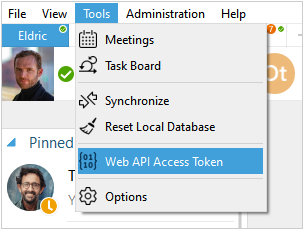
Web API access tocken
2.Click 'Renew API token' button. Please note! if you have already generated an API token, it will stop working
chat-room ID
ROOM_ID is required to send messages through API. To get the ROOM_ID you need to do the following:
1.Right click on the needed chat-room in the chat-rooms list of Virola
2.In the appeared drop-down list get the ROOM_ID
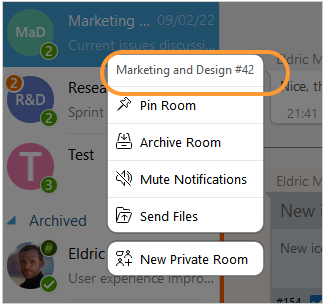
Chat room ID